

Wireframing software powered by AI is the table salt of design tools in 2026. At core, they all turn text/image prompts into wireframes equally. Yet, some are more equal than others. But just reading their feature list and comparing pricing only tells that no one-size-fits-all. So how do we know the potential of a wireframing AI? We let them take one shot at one (and the same) prompt. And this is what I did to rank the top wireframing tools categorized by their AI features.
My test prompt:
“Design a 3-screen wireframe for a sports event booking mobile app. Users should be able to view event details, book ticket filling in relevant details, and complete payment before time runs out.”
AI-native Wireframing Tools | |
Legacy Wireframing Tools with AI | |
AI Wireframing with Whiteboard | |
Open-source Wireframer with AI plugin |
Top AI UI Tools Ranking in 2026 >
AI-native Wireframing Tools
Banani: Best AI Wireframing Tool
Banani is an AI-native UI design copilot. Describe a screen or flow in plain language, and it generates structured, editable wireframes you can refine through follow-up prompts and export straight to Figma.
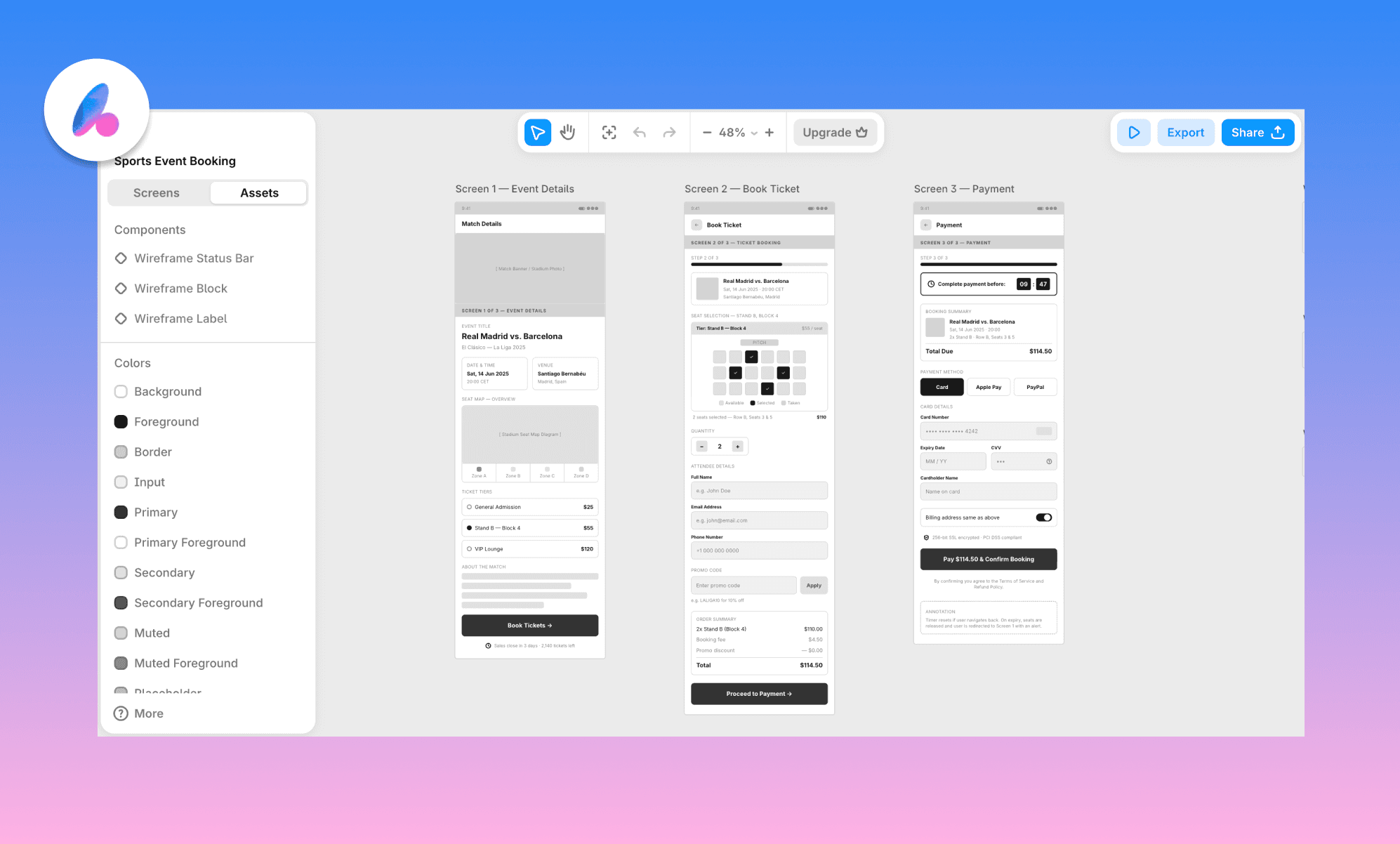
Check out this wireframe and edit with Banani AI, free >
Time taken: ~2 minutes | Credits consumed: 4
Output analysis: Banani's AI Design Agent asked clarifying questions before generating (including which sport), and the payoff showed: all three screens nailed the brief, with a breadcrumb tracking purchase step and genuine urgency cues. It also outputs a reusable design system alongside the screens.
Use it for: Fast, iterative AI wireframing (or UI design) with natural language.
Key features:
Iterates on wireframes through natural language follow-up prompts
Exports directly to Figma as editable layers
Converts wireframes into high-fidelity UI or desktop layouts
Generates a reusable component/design system file alongside screens
Try Banani AI Wireframe Generator, free >
Stitch: Smart structure & system to build on
Stitch (formerly Galileo AI) is Google's free AI UI generator, built on Gemini, that turns text prompts into multi-screen designs alongside a downloadable Design MD file. Positioned as a vibe design tool, it’s in beta and free (with limited daily credits).
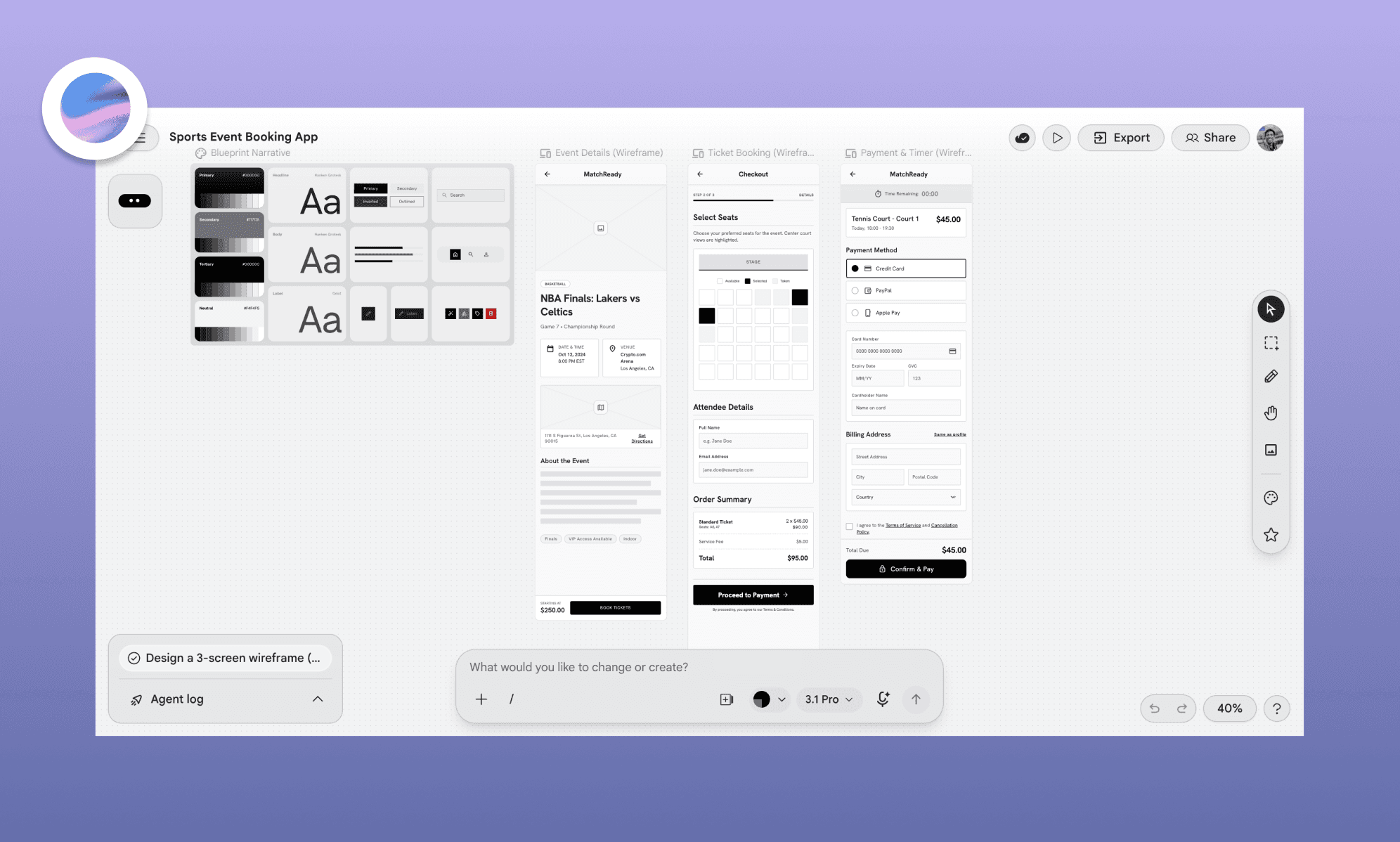
Time taken: ~2 minutes | Credits consumed: 7 (of ~400 daily free credits)
Output analysis: Stitch built a full design system before generating the wireframe. The flow and CTAs were right, and the seat-selection map was a smart call, since it removed the need for a separate headcount step entirely. The payment screen felt cramped by comparison, and the ticket preview could have used more detail.
Use it for: Free, design-system-backed wireframes for PMs and non-designers.
Key features:
Generates a complete design system
Multimodal input (text, image, sketch)
Is Stitch really free in 2026? >
Legacy Wireframing Tools with AI
Balsamiq: Blazing fast, barely usable output
Balsamiq is the long-standing low-fidelity wireframing tool. Since 2025, it has introduced an AI layer that turns a prompt into a rough flow draft; built for teams who want structure over visual polish.
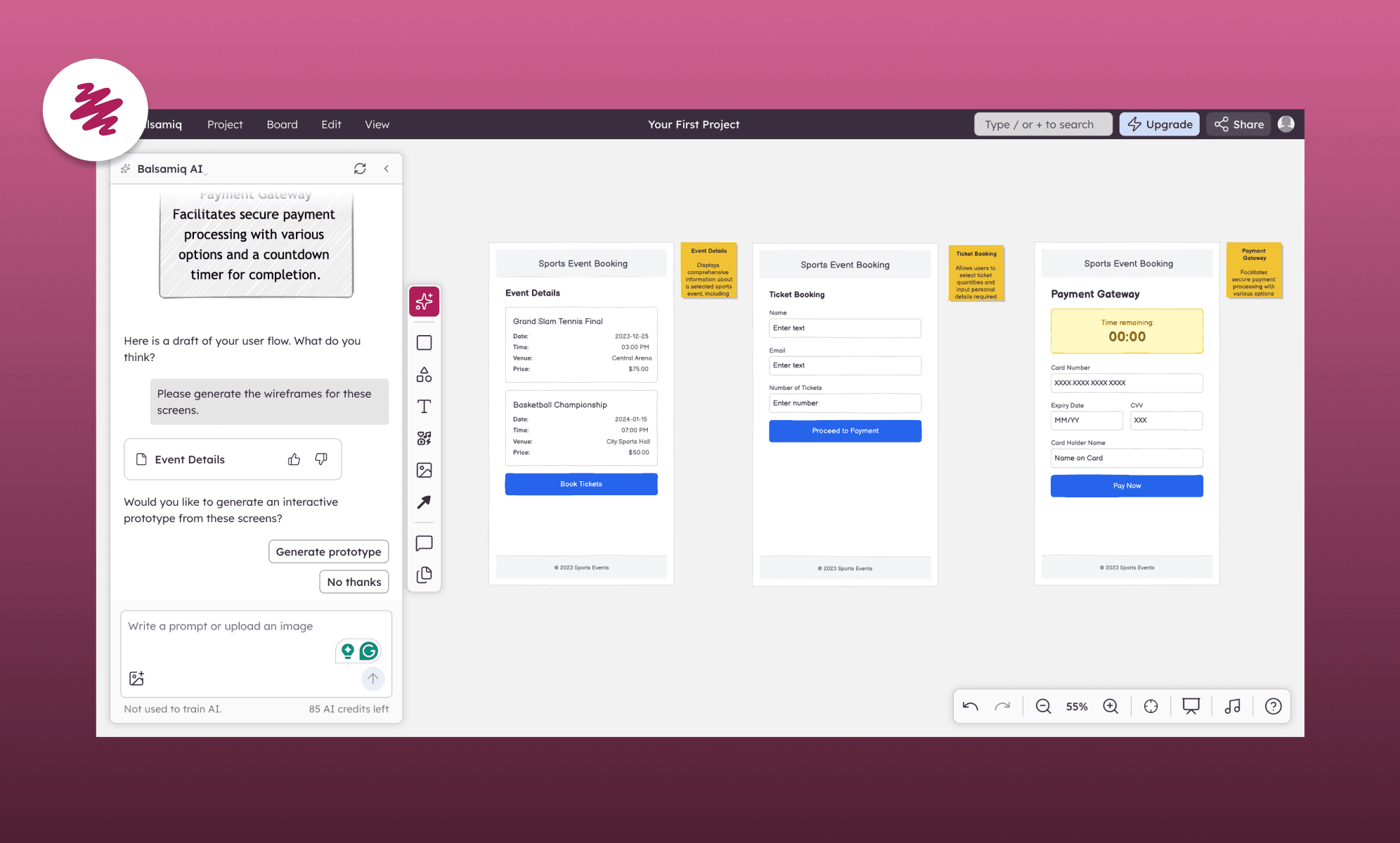
Time taken: ~30 seconds | Credits consumed: 15
Output analysis: Genuinely the fastest tool I’ve ever tested. But the speed bought very little: just boxes and labels, no visual structure, no image placeholders, and no real indication of booking or payment logic. The output needed so much manual rebuilding that it's hard to call it a head start.
Use it for: Ideation & ease of use over AI-generated depth.
Key features:
AI-generated flow drafts from a single prompt
Drag-and-drop manual editing on top of AI output
Built specifically for intentionally rough, distraction-free wireframes
Comment-based collaboration for stakeholder feedback
Lo-fi vs hi-fi design difference >
Figma Make: Interactive, but crowded
Figma, the industry-standard design tool, now ships an AI layer (Figma Make) that generates interactive, scrollable prototypes from a prompt. However, frankly, it’s built more as an AI app builder than a dedicated AI wireframing tool.
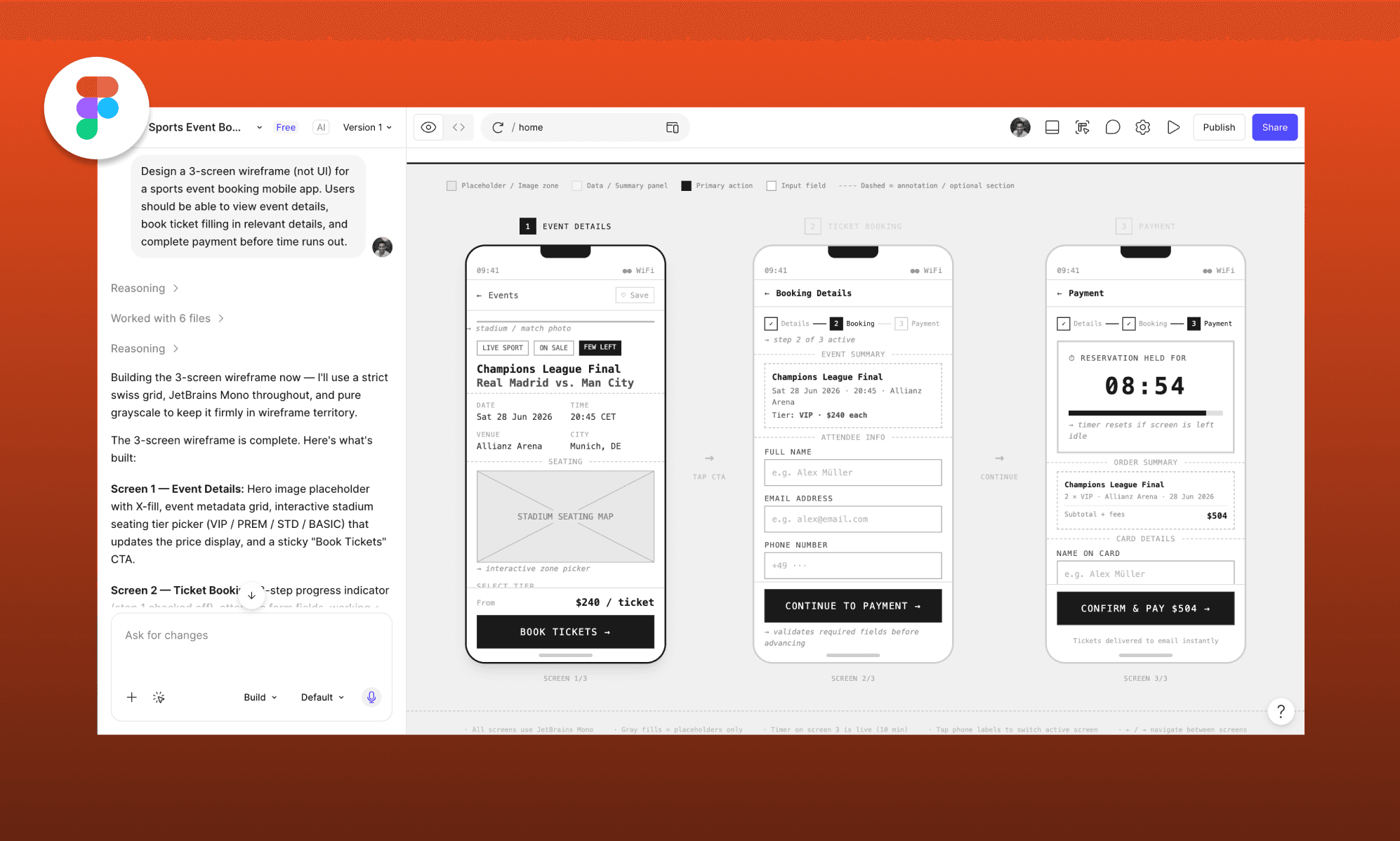
Time taken: ~3 minutes | Credits consumed: 30
Output analysis: Figma Make showed its reasoning step by step. The flow was right, and the output was interactive with apt placeholder copy, but it felt crowded. Plus, the countdown timer was almost too prominent. Where Figma wins is post-generation: its manual editing tools are the most capable of any tool tested.
Use it for: Innovative AI design features that are, manually-refinable
Key features:
Generates interactive, scrollable prototypes (not static wireframes)
Step-by-step reasoning visible during generation
Deep manual editing tools post-generation
Full Figma ecosystem (Dev Mode, component libraries, handoff)
AI Wireframing with Whiteboard
Miro AI: Gets the big picture, misses details
Miro is the collaborative whiteboard platform most teams already use for brainstorming, with an AI Sidekick layer that can generate wireframes directly on its classic infinite canvas.
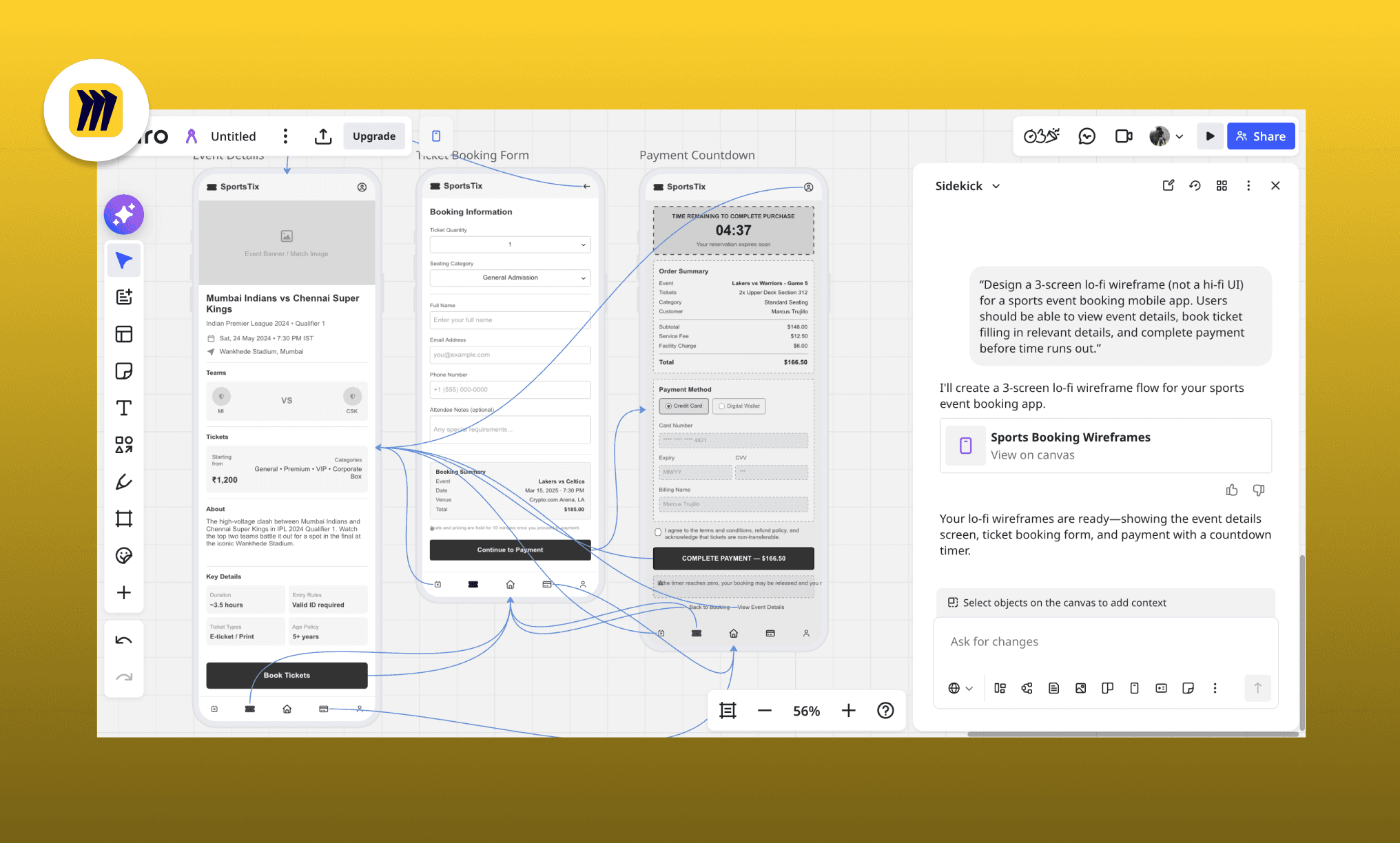
Time taken: ~2 minutes | Credits consumed: 15
Output analysis: It nailed the flow, and the copy held up (it interestingly chose cricket as the sport). Some details missed the mark though; for instance, a seating map in the booking screen would have helped. And some footer text overflowed its container. Miro's output came with prototyping links built in, something all of the others skipped.
Use it for: Innovative AI design features that are manually-refinable
Key features:
Can generate wireframes from all the references in the canvas
Outputs include built-in prototyping links
5,000+ templates and 160+ app integrations
Strong for teams already using Miro for cross-functional collaboration
My Miro Free Account Experience >
Mockflow: Confident pitch, broken screen
MockFlow pairs Mida, its built-in AI assistant, with a wireframing and IdeaBoard canvas. It’s ideal for teams who want wireframes, flowcharts, and schemas generated from the same brief.
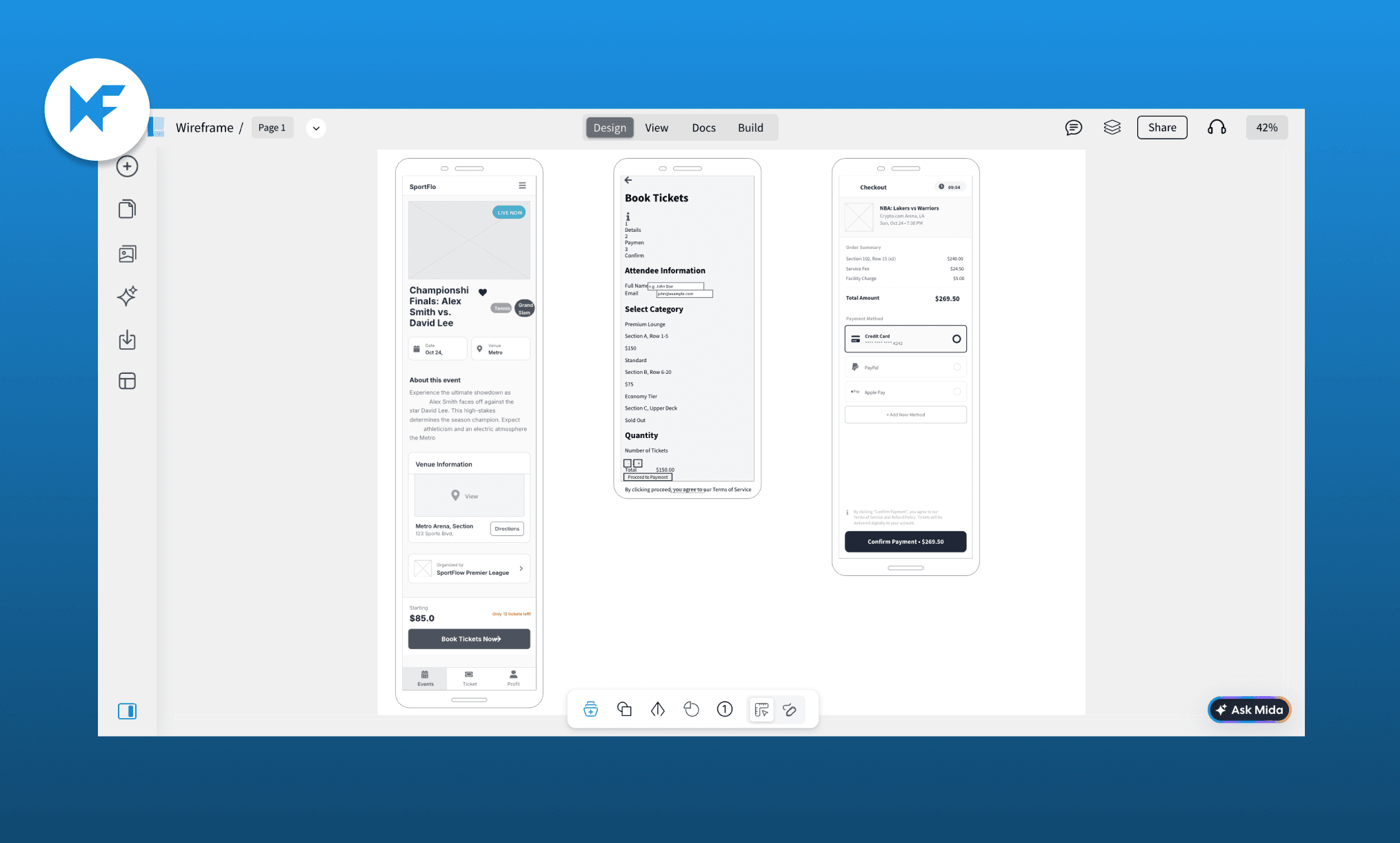
Time taken: ~4 minutes | Credits consumed: 21
Output analysis: Before generating, Mida walked through everything it could build from the brief, but that confidence didn't carry through to the output. The design looked dated with boxy components, and alignment and button sizing were inconsistent throughout. The booking screen failed outright. And it was also the slowest tool in the lineup.
Use it for: Generating wireframes, flowcharts, and schemas from one brief.
Key features:
Can build wireframes, flowcharts, and schemas from one brief
Screenshot-to-wireframe via browser extension
1,000+ pre-built UI components
Real-time collaboration with comments and versioning
Open-source Wireframe with AI plugin
Penpot: Give API key, only to get a bare box
Penpot is the leading open-source, self-hostable Figma alternative. It does not have a native AI agent, but a community plugin for it that connects to your own LLM API key.
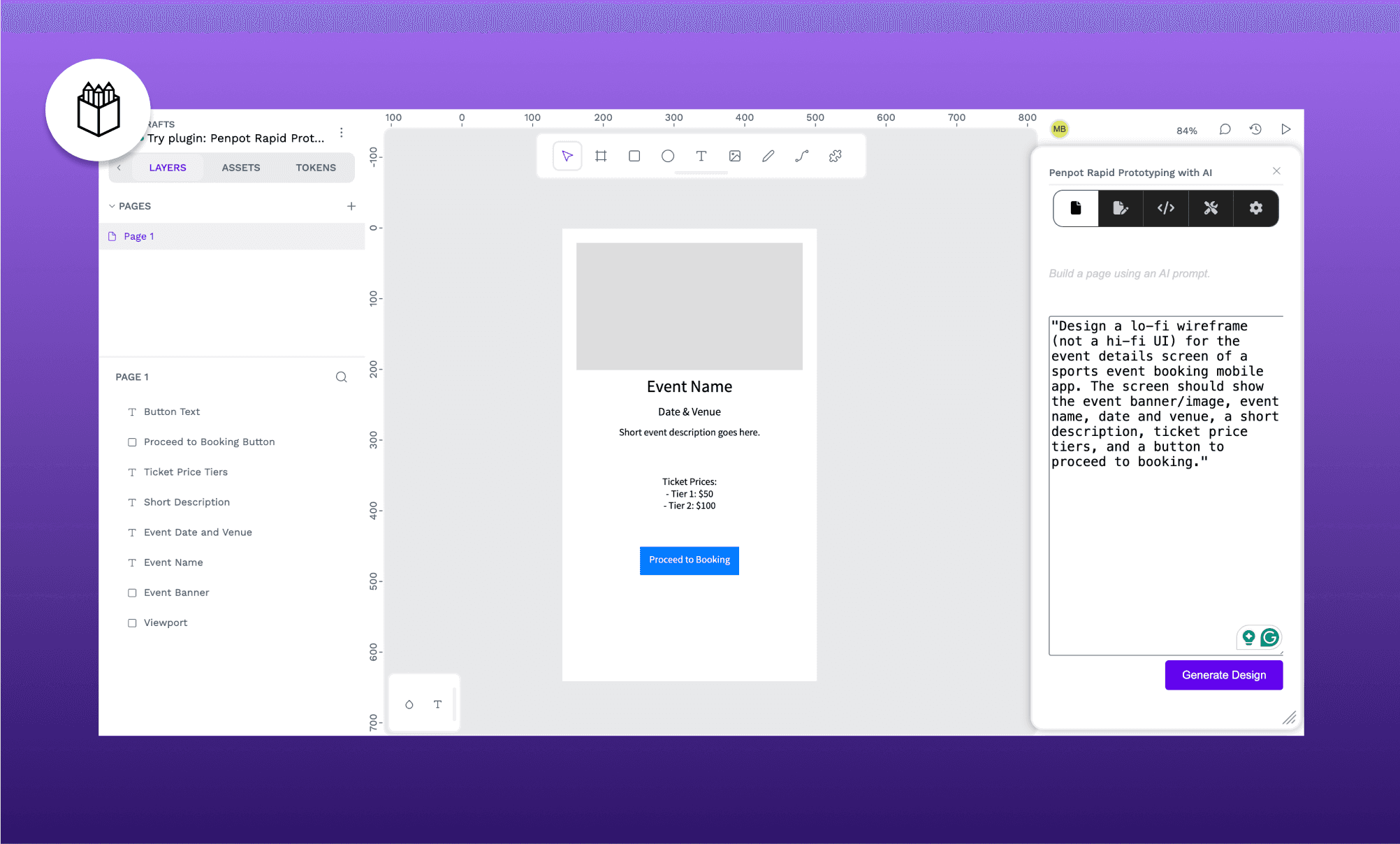
Time taken: ~15 seconds | Credits consumed: ~2k OpenAI tokens
Output analysis: It required installing the "Rapid Prototyping with AI" plugin and connecting an LLM myself (I linked my OpenAI API). Already a steeper bar than its peers. In the first attempt produced just one bare box payment screen. So I tried again asking it to focus on just the event detail screen, with full content specified. Didn't help either; same plain box, same basic button. Not usable in its current state.
Use it for: Free, self-hosted design; but not AI wireframing (yet).
Key features:
Free, open-source, fully self-hostable design platform
AI wireframing via community plugin, bring-your-own LLM key
Native design tokens and component system
Auto-generates inspectable CSS, HTML, and SVG on handoff
Open Source Alternatives to Claude Design >
Other Notable AI Wireframing Apps
Seven tools can't cover every workflow. For that matter, not even two dozen can. A few more AI wireframing software are worth a look for specific needs — faster prototyping, website cloning, or rapid site mapping — that didn't make my core ranking but deserve a mention.
Tool | Best for |
Fast prompt-to-wireframe with Figma handoff for product teams | |
Non-designers turning rough ideas into clickable prototypes fast | |
Generating production-ready React components alongside wireframes | |
Sketch-to-wireframe conversion for early-stage concept testing | |
AI site mapping before wireframing full website structures | |
Exploring multiple AI-generated wireframe variations per prompt | |
Whimsical | Pairing flowcharts and wireframes in one connected workspace |
Sketch-style wireframes for early, low-pressure flow mapping |
Best AI Prototyping Tools in 2026 >
Best AI Wireframing Tool For You
When considering a purchase of a wireframe platform, my recommendation would be to look beyond the one-shotting capabilities and focus on fitment into your workflow and budget. You can zero-in on the right wireframing AI app for yourself by answering these questions for yourself:
Are you comfortable editing designs manually, or need AI to do it all?
If you want AI to start the wireframe but expect to refine it yourself: Figma
What's your role in the process — PM, founder, designer, or developer?
Designers refining flows for a team: Miro
Teams wanting wireframes alongside flowcharts/schemas: MockFlow
How fast do you need a usable first draft?
Need it in under 1 minute even if low details: Balsamiq
Can spend a few minutes in return of great details: MagicPath
And, of course, my pick for the top AI wireframing tool is Banani AI, because the price-to-quality ratio matters as much as any feature checklist. When considering a purchase of an AI wireframe platform, it stood out across this test as the most reliable and versatile option, consistently nailing structure, speed, and logic; at a fraction of what legacy tools charge.
FAQs on Best Wireframing AI Software
What is the best wireframing tool for web design?
Banani is the best all-around pick for web design wireframing, thanks to fast, accurate one-shot output and direct Figma export. Figma Make also works well if you're already in its ecosystem and want manual control alongside AI.
Is Figma a wireframing tool?
Yes, but that’s only the tip of Figma’s iceberg. It’s actually a full design and prototyping platform. Its AI layer, Figma Make, added prompt-to-wireframe generation.
Which is better, Figma or Balsamiq for AI wireframing?
Referring to my review, I’ll say Figma. Balsamiq's AI output was bare-bones (i.e. boxes and labels) with no real structure. While Figma AI produced a usable, interactive flow, even if slightly crowded.
Can ChatGPT generate wireframes?
Not directly. ChatGPT can describe a wireframe in text or help write a prompt, but it doesn't generate visual, structured wireframes.
Which wireframe software are recognized for their cost-efficient pricing?
Banani and Stitch lead in cost-efficient wireframe AIs. Stitch is free during its beta (~12k credits/mo), and Banani has a free-forever plan (~170 generations/ mo). Between the two, Banani has an edge for high-volume design teams because you can top up credits for as low as $12/mo, or go unlimited for $30/mo.
References
[1] banani.co
[2] stitch.withgoogle.com
[3] balsamiq.com/product/ai
[4] figma.com/solutions/ai-wireframe-generator
[5] miro.com/ai/wireframe
[6] mockflow.com/ai/create-wireframes-with-ai
[7] penpot.app/penpothub/plugins/rapid-prototyping-with-ai


