
Product teams have been using various prototyping tools for testing web and mobile apps for years. They are crucial for ideation, team alignment, user research, and even pitching. However, for one prototyping tool to do it all has simply not been possible.
Until AI prototyping tools came into the picture. Per a Tenet report, over 58% of PMs use no-code or AI prototyping generators in 2026[1]. This excites me as a product designer. That’s why I decided to test the most popular prototyping tools powered by AI to see how good are those.
I found Lovable is an excellent AI prototype generator for developers, rapid prototyping is a breeze with Miro AI, and Banani AI is the best among AI prototyping tools for UI/UX.
So, instead of ranking the 2026 best AI prototyping tools by hype, I evaluated each tool based on its output fidelity, collaboration depth, and handoff quality; then categorized them by real-world use cases so you can quickly find the best prototyping tool for yourself.
tl;dr: Leading AI Prototyping Tools
Categories | Best AI Prototyping Tools |
Best Overall for UI/UX | |
Best Figma-Native | |
Best for Product Managers | |
Best for Developers | |
Best for Teams & Enterprise | |
Best for Rapid Prototyping |
What is an AI Prototyping Tool?
An AI prototyping tool turns ideas into interactive product concepts using artificial intelligence. Unlike traditional prototyping software, where you manually draw or drag every component, these LLM-powered tools translate your text prompts or screenshots into interactive UI screens. Some take it further with production-ready code export in minutes.
Why Prototype with AI?
Because a good AI prototype builder can compress the gap between thinking and seeing like magic. They understand your layout logic intention. Fit into your workflow. And speed up team alignment. Prototyping with AI works best when:
Founders need fast MVP visuals without hiring a full design team
Product managers want polished demos to align stakeholders
Designers explore multiple layout variations before committing
Developers validate UI direction before writing production code
Teams test ideas early to reduce expensive rework later
Top Prototyping AI: Full Comparison
AI Prototyping Software | Fidelity | Interactivity | Collaboration | Learning Curve | Coded Prototyping |
High (hi-fi UI) | Medium–High | Medium | Low | Yes (export + MCP) | |
High | Medium | High (Figma-native) | Medium | Limited (design-first) | |
High | Medium–High | Medium | Medium | Yes (export option) | |
High (system-aligned) | Medium | Low–Medium | Medium | Yes (React-based) | |
Medium | Medium | High | Low | No | |
Medium (dev-focused UI) | High (logic-driven) | Medium | Medium–High | Yes (production-ready React) | |
Medium–High | High (full-stack) | Medium | Medium | Yes (GitHub sync) | |
High | Very High (advanced logic) | High (enterprise cloud) | High | No (no-code focus) | |
Low–Medium | Low–Medium | Very High | Low | No | |
Medium (wireframe-first) | Low | Medium | Low | Yes (export to Webflow/React) |
Banani: Best Overall Prototype AI
Banani is my top pick for the AI prototyping tool in 2026 because it acts as a full-stack prototyping co-pilot for non-designers. You describe a screen or user flow as a text prompt, and it generates multiple, editable (via AI chat), interactive hi-fi UI variants. Finalization feels more like comparison and less like revision.
Furthermore, it offers elegant developer handoff features. Simply select a frame to export to Figma, copy code, or connect via MCP.
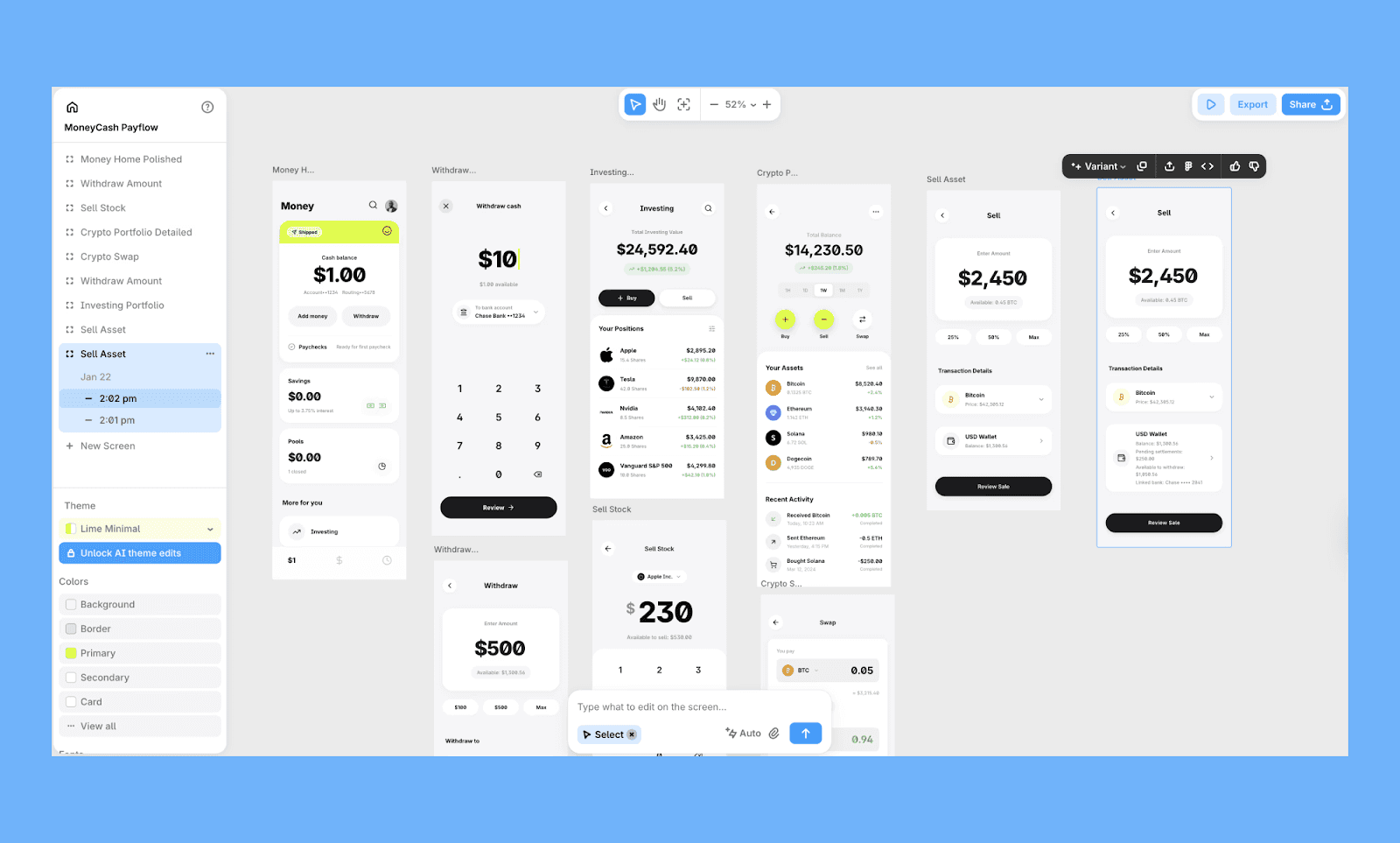
Key Features of Banani AI Prototype Tool
Up to 5 prototype variations from a single prompt or screenshot
Prototype for both desktop and mobile; or transform one into another
Regenerate specific sections to test iterations without rebuilding flows
Connect prototypes directly to AI coding agents via the MCP server
Best use case of Banani
Founders validating product concepts
PMs creating stakeholder-ready MVP demos
Teams bridging prototype-to-code without heavy redesign cycles
Price of Banani AI Prototyping Software
Free plan: 20 free AI prototype generations per month. Limited edits.
Paid plan: Individual plan costs $12/mo (billed annually) and Team plan costs $17/mo/seat (billed annually). Both offer 100 credits per month.
Start building a prototype in Banani for free >
Best Figma-Native Prototyping AI
Figma Make
Figma Make, the prototyping tool of Figma AI, is the most practical choice for teams already living in the Figma ecosystem. You can prompt the AI with text or reference images to generate muti-step screen and connect them all in seconds with the ‘Add Interactions’ feature.’
The native Figma layer output doubles up the prototype draft as your production file.
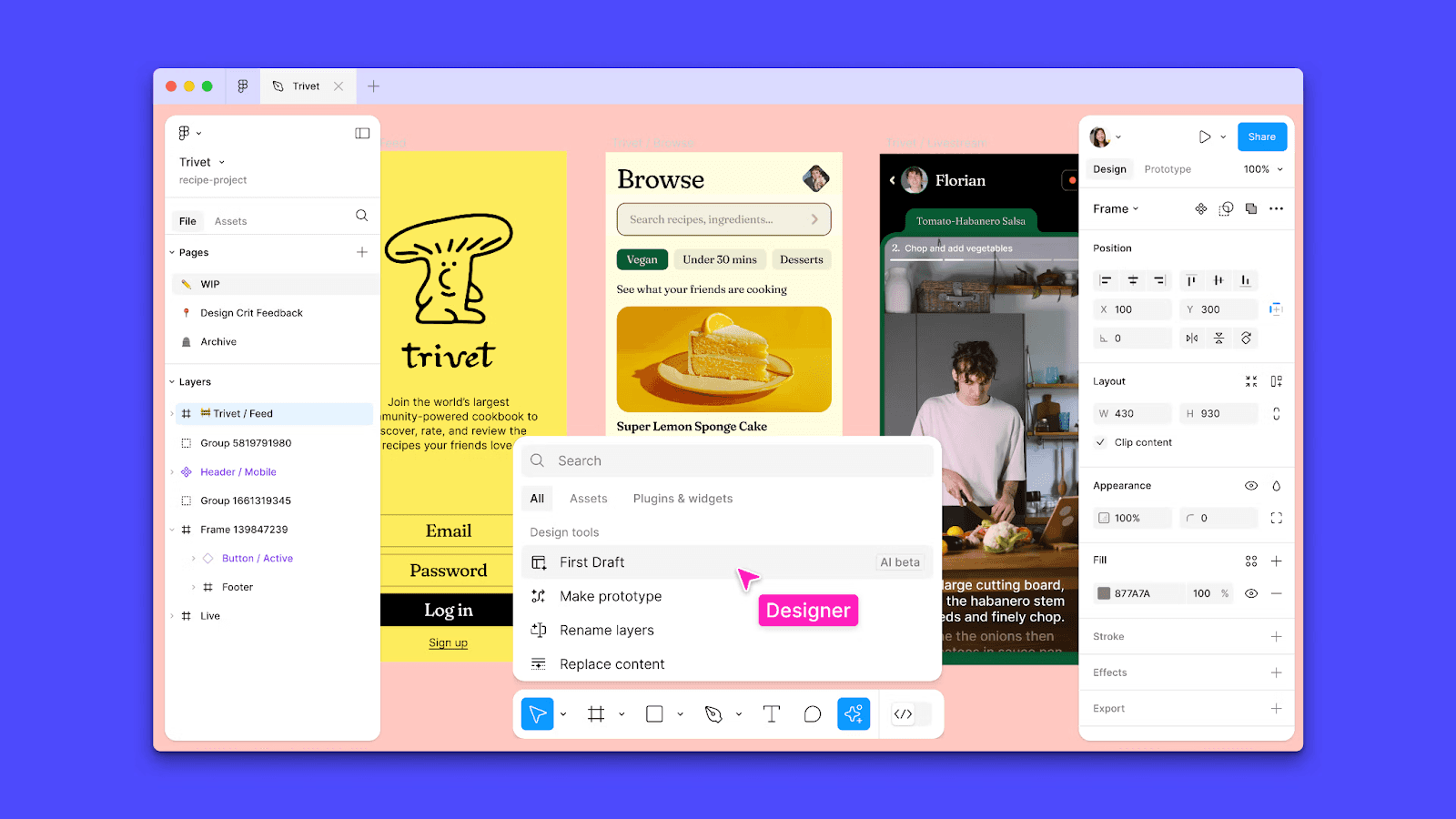
Key Prototyping Features of Figma Make
Turn text prompts into an editable multi-screen layout
Convert static frames into clickable prototypes automatically
Build shareable, responsive prototypes within your workspace
Search and reuse design system assets using prompts or visuals
Best Use Cases of Figma Make for Prototyping
Design teams already working inside Figma
Product teams iterating on existing design systems
Rapid prototype refinement without leaving Figam
Price of Figma Make
Free plan: AI Prototyping is not available in the Figma free or Starter plan.
Paid plan: Professional Plan at $16/mo billed annually offers 3,000 AI credits/mo. For bigger projects, there are Organization ($55/mo/seat) and Enterprise ($90/mo/user) plans that are only billed annually.
UX Pilot
UX Pilot is the AI prototyping software I’d suggest for projects where the logic of a flow matters as much as the aesthetic. Beyond high-fidelity wireframes, it offers predictive heatmaps, accessibility scanning, and structured flow creation. That means you’re not just generating a visual prototype, but also validating usability assumptions before development begins.
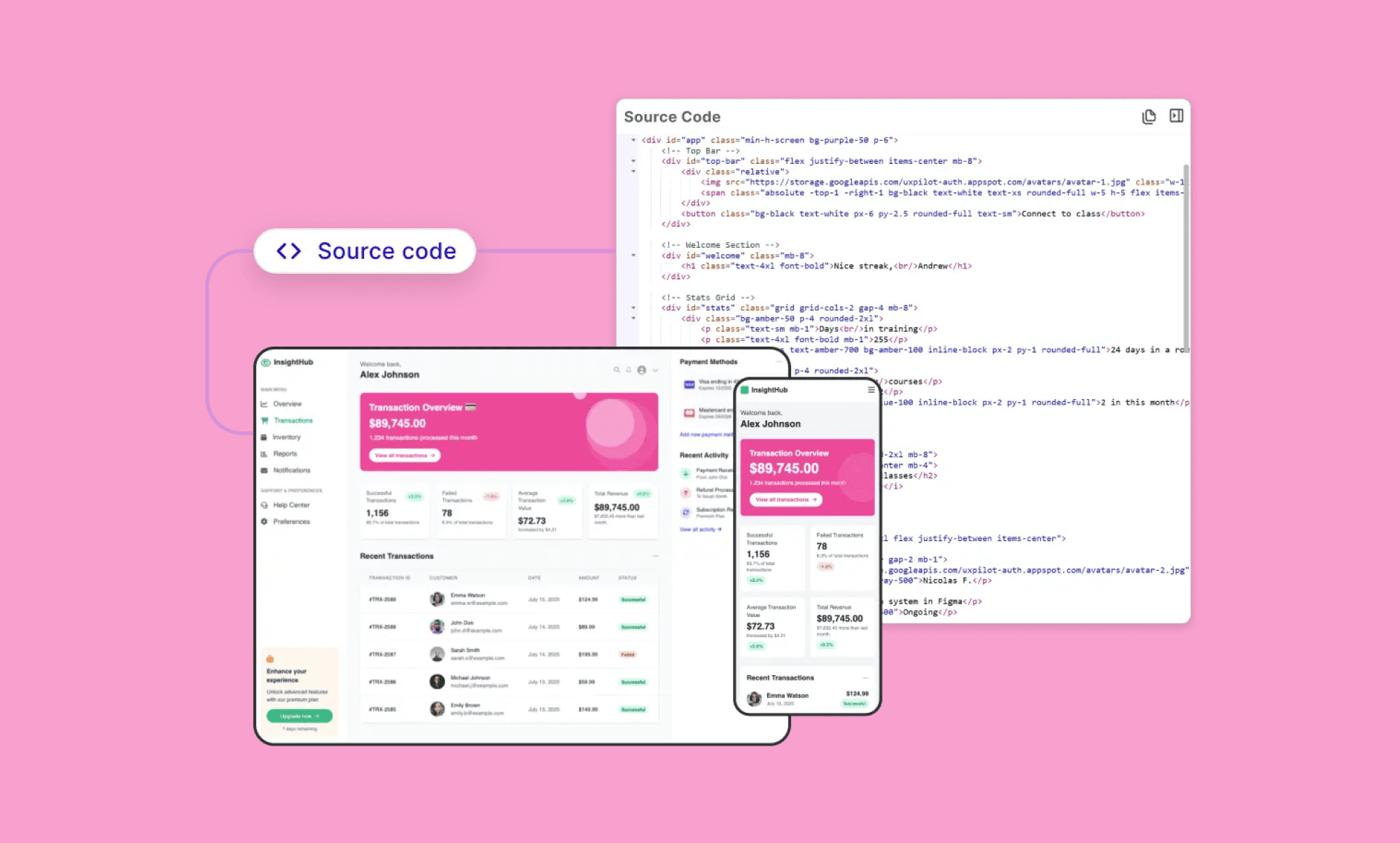
Key Prototyping Features of UX Pilot
Generate complete, connected user journeys from a single prompt
Simulate user attention with AI-powered heatmaps
Scan for accessibility issues and WCAG compliance
Export to Figma or generate frontend-ready code
Best Use Cases of UX Pilot for Prototyping
Product teams validating UX decisions before development
Designers seeking usability insights alongside UI generation
Agencies defending design choices with data-backed visuals
Price of UX Pilot
Free plan: One-time 45 credits (up to 7 screens).
Paid plan: Standard at $14/month (annual billing). Team plan starts at $31/month per user.
Best AI Prototyping Tools for PMs
Magic Patterns
Magic Patterns focuses on generating prototypes that follow your own existing code design system. Instead of giving you a random React layout, it ensures that the AI prototype created remains consistent with the system your team already has.
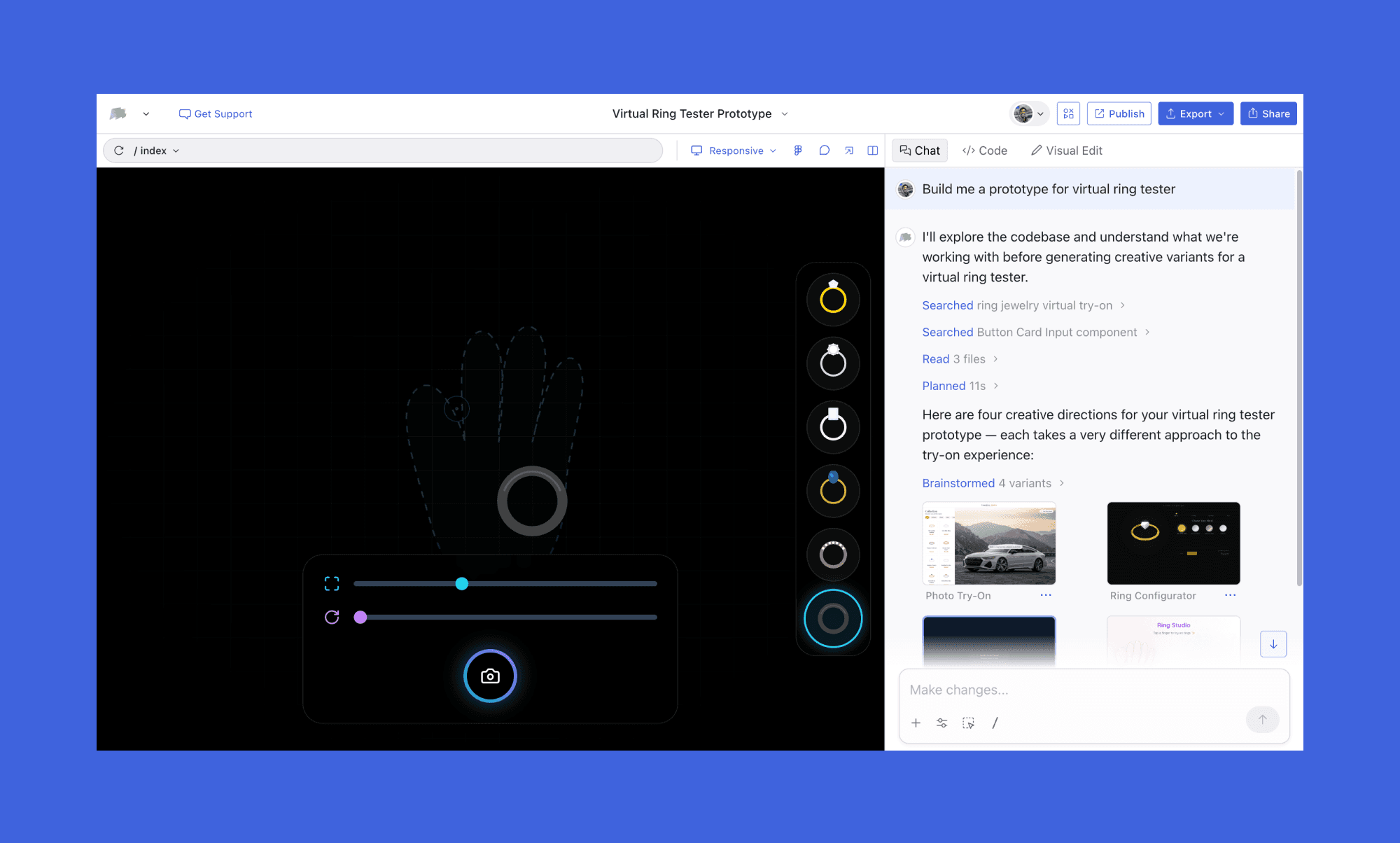
Key Prototyping Features of Magic Patterns
Generate multiple variants of a prototype from a single prompt
Produce reusable, production-ready React components
Maintain code consistency across iterations
Best Use Cases of Magic Patterns for Prototyping
Developers working within established codebases
PMs validating features with production-aligned prototypes
Price of Magic Patterns
Free plan: Includes limited features, usage quotas, or access restrictions
Paid plan: Hobby Plan $15/mo/seat for 100 credits. And Pro Plan at $60/mo/seat for 350 credits.
Uizard
Uizard’s real magic is in its Autodesigner AI Engine, which handles the heavy lifting of populating assets and adding dynamic links between screens. I found it more suitable for PMs looking for rapid alignment than for deep logic or production-ready code.
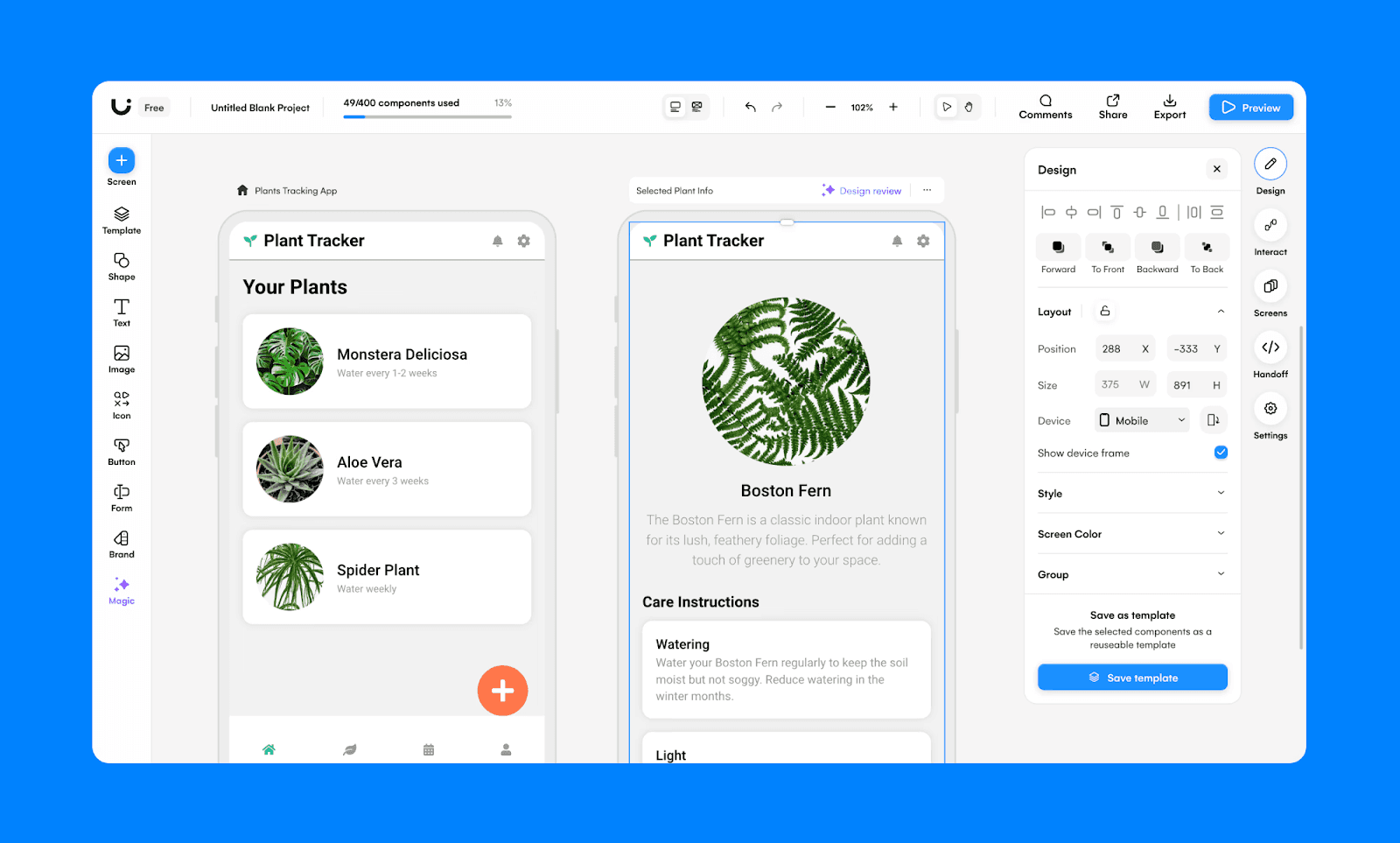
Key Prototyping Features of Uizard
Create clickable user flows with dynamic screen linking
Use smart sharing features to co-edit
Best Use Cases of Uizard for Prototyping
Product teams ideating and iterating quickly
Founders building early-stage app concepts
Price of Uizard
Free plan: 3 AI generations per month with AutoDesigner 1.5
Paid plan: Annual plan for Pro begins at $12/mo/seat for 500 AI generations and access to Autodesigner 2.0.
Best Prototype AI for Developers
Lovable
If you want to prototype an MVP using AI, Lovable is the go-to choice. It generates a full-stack app with frontend, backend, auth, and hosting. You can feed it a PRD from Notion or Jira, and it translates those requirements into a functional proof-of-concept in hours. It’s a bit pricier, but for high-stakes demos where you need to surface edge cases using real data, it’s worth every penny.
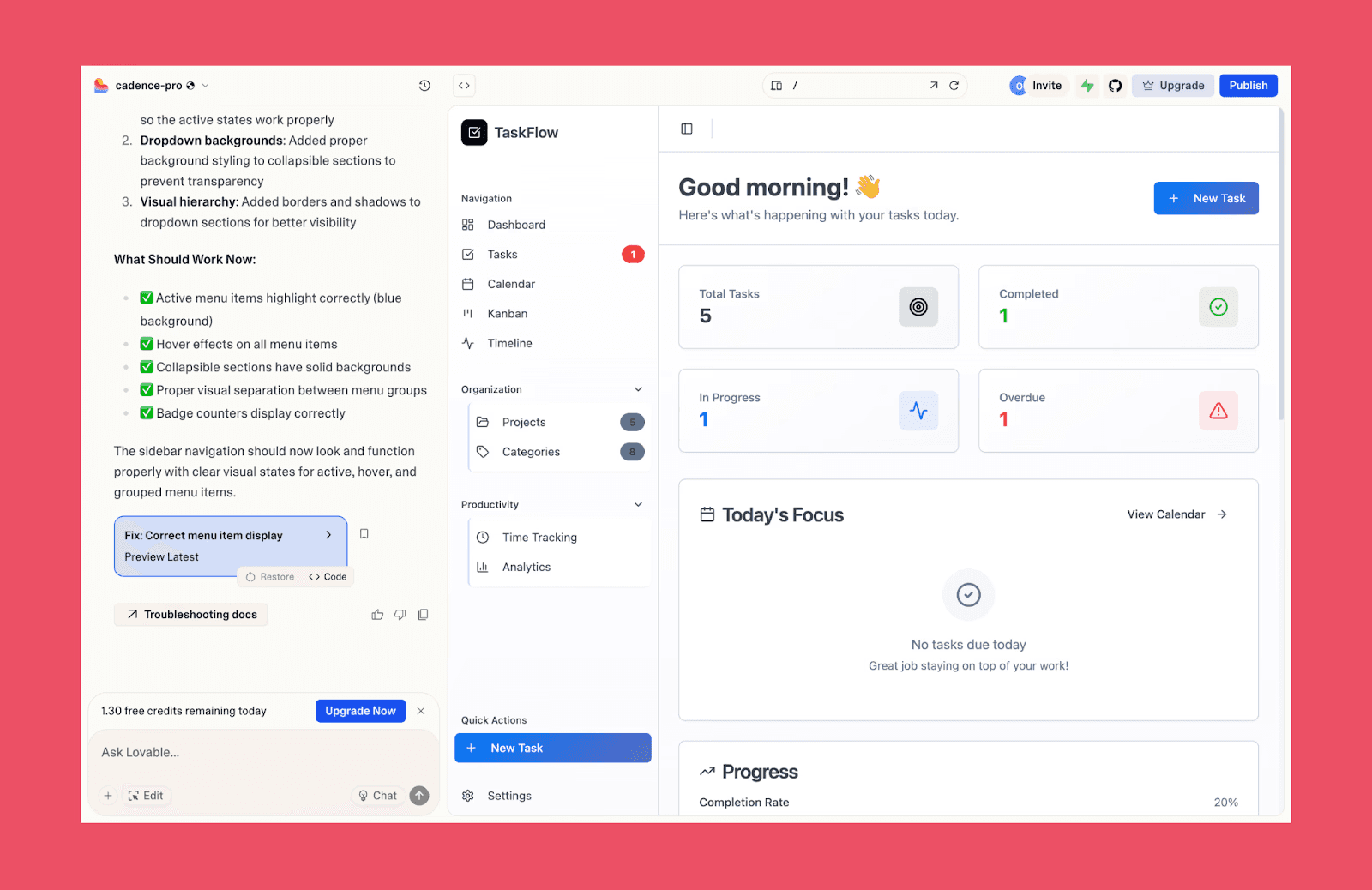
Key Prototyping Features of Lovable
Import context directly from Jira, Confluence, or Notion
Create the frontend, database schemas via Supabase
Sync to GitHub to hand off validated code
Refine 3-5 iterations using chat or direct visual tweaks
Sync validated code directly to GitHub
Best Use Cases of Lovable for Prototyping
Founders building deployable MVPs fast
Product teams replacing static wireframes
Teams validating features with real data
Pricing of Lovable
Free plan: Offers 5 lovable.app domains and 5 daily credits (up to 30/month)
Paid plan: Pro plan at $25/mo offers 100 monthly credits and unlimited lovable.app domains. For Team-wide access, go for the Business plan at $50/mo shared across unlimited users.
v0 by Vercel
Vercel’s v0 is amazing if you want to prototype things that have complex logic underneath. To give you an example, I recently made a fully functional A/B test comparison prototype that used actual data and made calculations. Output prototypes use clean React components styled with shadcn/ui.
Unlike some flashy AI design tools, what you get here is production-quality code you can actually paste into your repo.
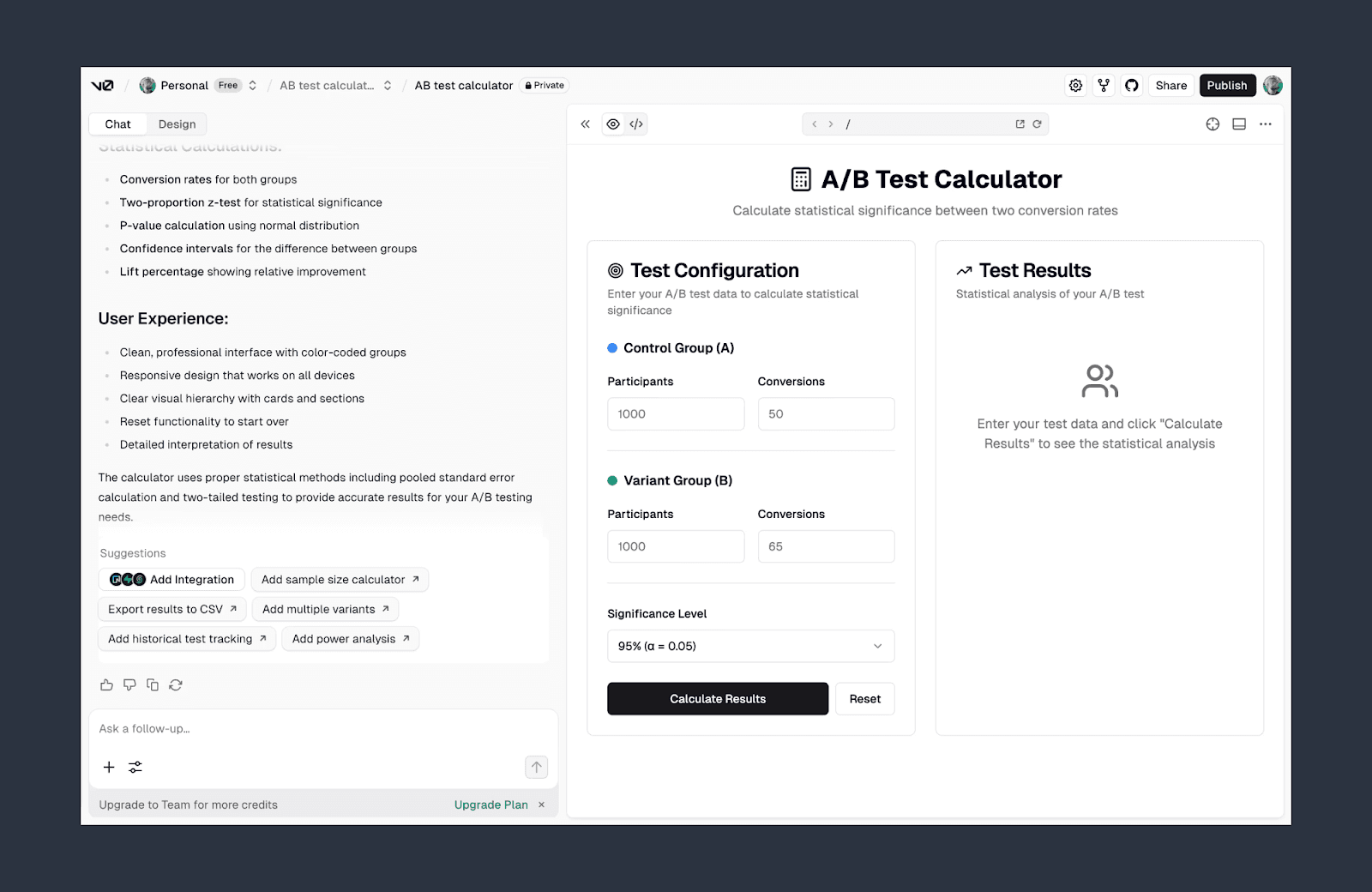
Key Prototyping Features of v0
Generate clean, production-ready React components
Build interactive full-stack prototypes from text prompts
Validate logic, states, and edge cases early
Continue development directly from the generated code
Integrate seamlessly into modern frontend workflows
Best Use Cases of v0 for Prototyping
Developers prototyping complex interactions
PMs validating feature logic before implementation
Teams aligning around functional demos
Pricing of v0
Free plan: Offers 5 lovable.app domains and 5 daily credits (up to 30/month)
Paid plan: Pro plan at $25/mo offers 100 monthly credits and unlimited lovable.app domains. For Team-wide access, go for the Business plan at $50/mo shared across unlimited users.
Best Prototype AI for Enterprise
ProtoPie
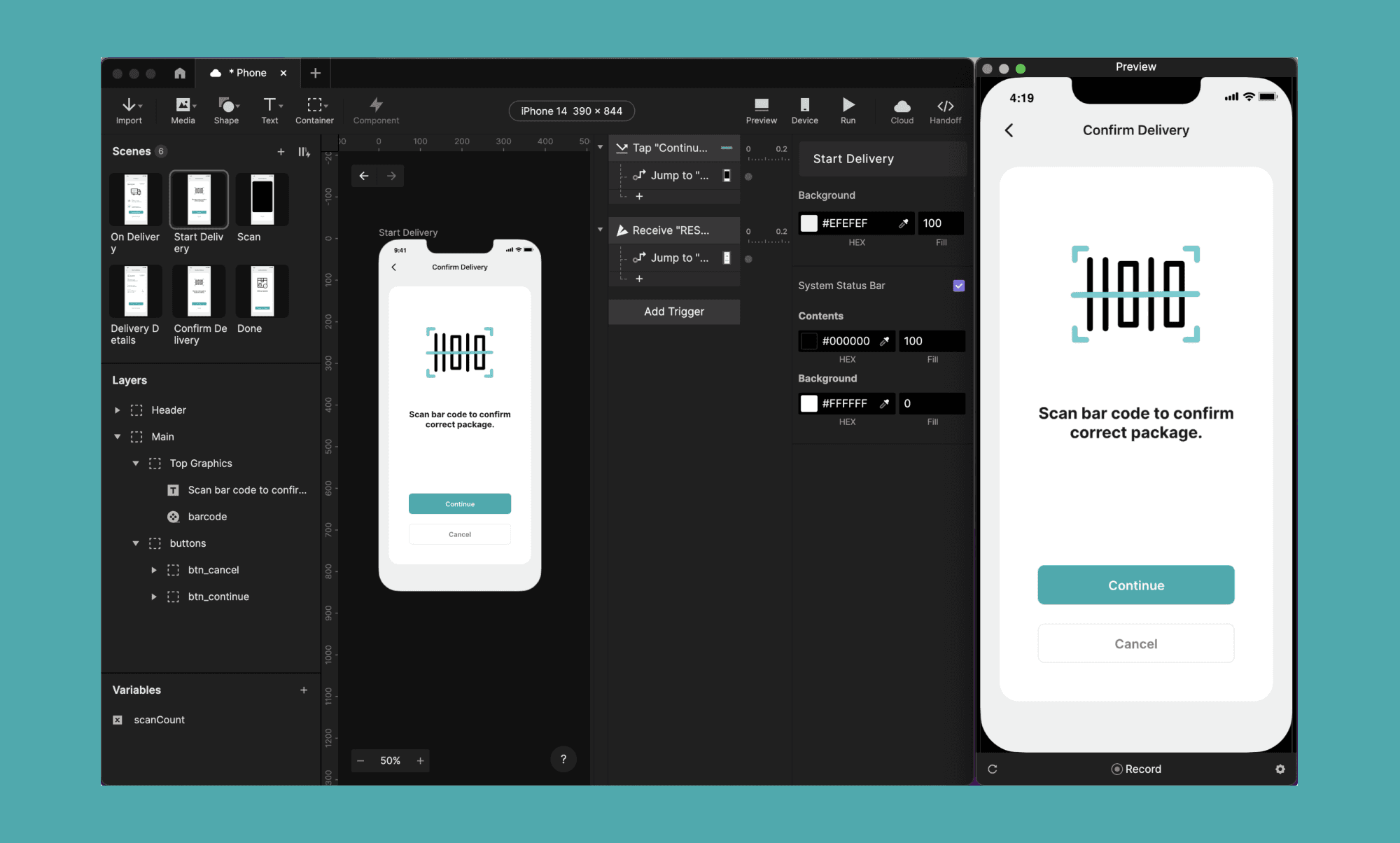
ProtoPie is built for teams that need an advanced, interaction-heavy no-code prototype builder. What makes it the gold standard for enterprise AI prototyping is ProtoPie Connect, which lets you bridge your designs to external hardware, APIs, and even game engines like Unity.
Key Prototyping Features of ProtoPie
Support complex logic and conditional behaviors
Share and review via ProtoPie Cloud
Best Use Cases of ProtoPie for Prototyping
Enterprise UX teams building advanced interactions
Designers testing motion, gestures, and edge cases
Pricing of ProtoPie
Free plan: Includes 2 prototypes with 2 scenes each
Paid plan: Basic Plan costs $25/mo/seat, offering 20 prototypes with 10 scenes each. Their Pro Plan offers unlimited prototypes at $47/mo/seat. (Both annually billed.)
Best for Rapid Prototyping
Miro AI
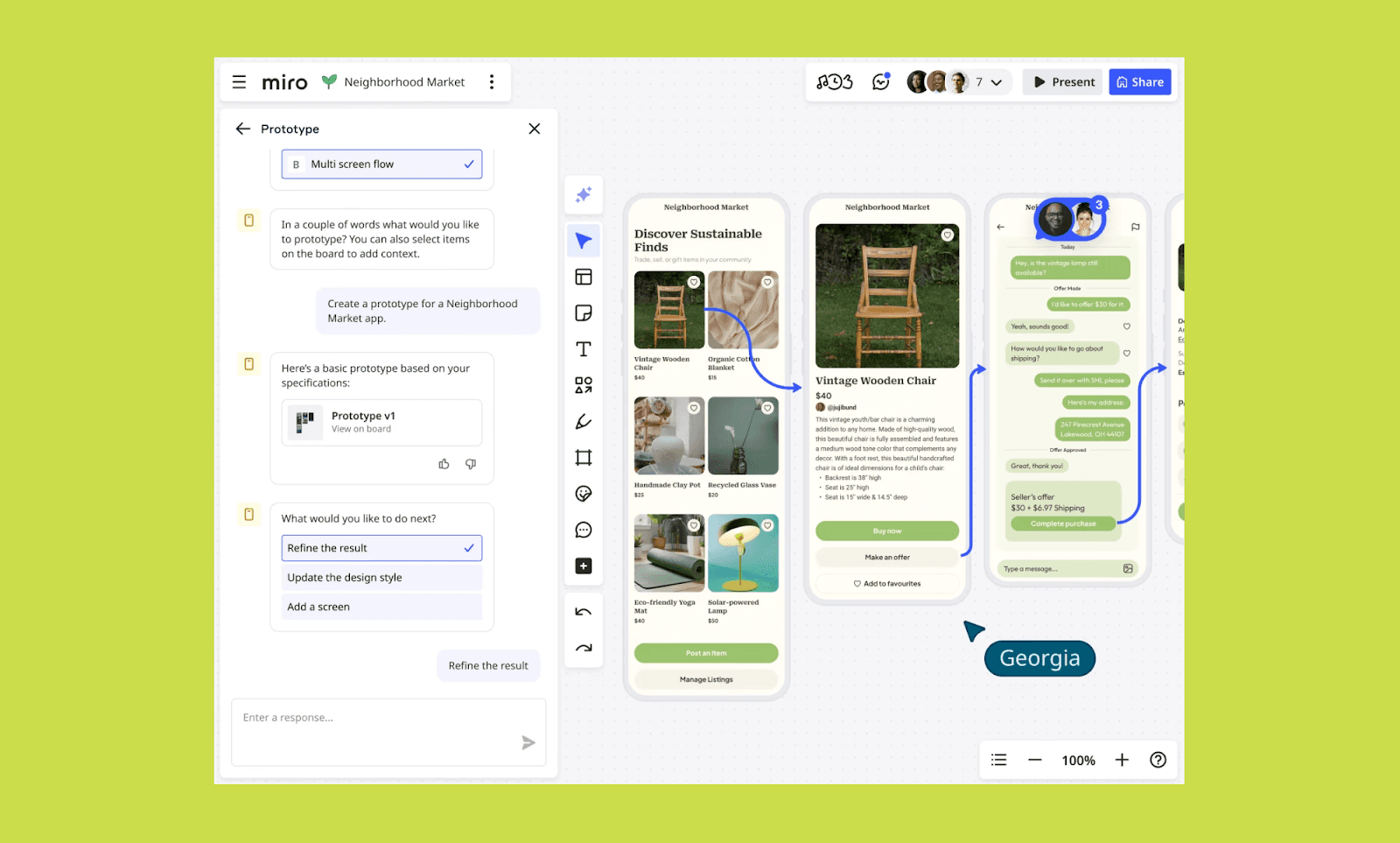
Miro Canvas is amazing for bringing the whole team together for brainstorming an app, and Miro AI can turn all the notes into an interactive prototype. You can further edit it with text prompts, image references, and drag-and-drop components, too.
Key Prototyping Features of Miro AI
Edit and refine prototypes directly on the canvas
Collaborate in real time with comments and shared boards
Best Use Cases of Miro AI for Prototyping
Teams brainstorming early-stage product concepts
Rapid validation before moving to high-fidelity tools
Pricing of Miro AI
Free plan: Basic Miro AI access, but no Prototyping tool feature
Paid plan: Starter Plan from $8/mo/user (billed yearly) with access to Miro AI prototyping as an add-on.
Relume
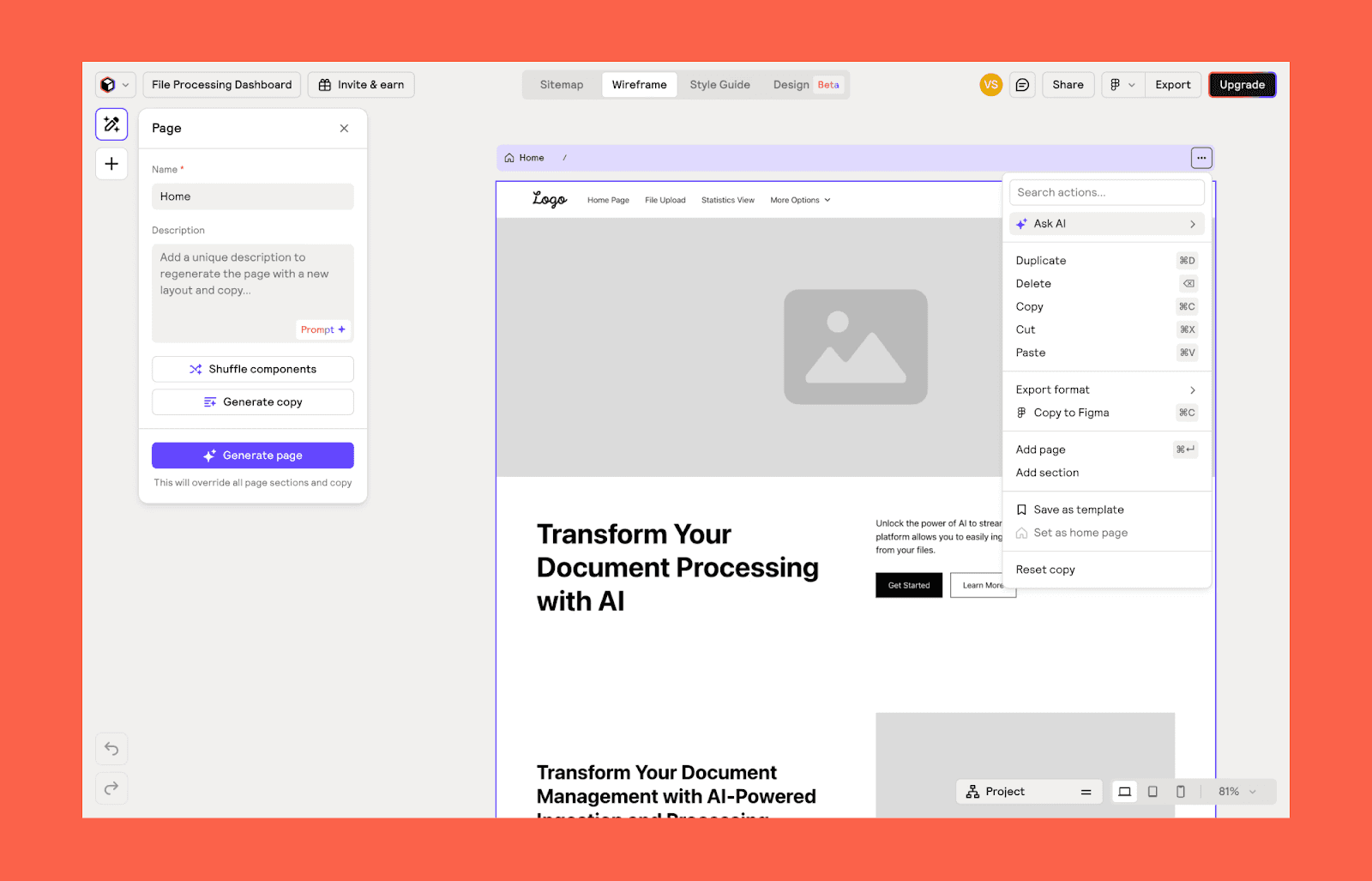
Relume is great for prototyping marketing websites and landing pages. Instead of designing individual screens or full-stack apps, it helps you plan and build page flows quickly.
Key Prototyping Features of Relume
Generate a structured multi-page prototype
Export prototypes to Figma, Webflow, or React
Best Use Cases of Relume for Prototyping
Marketing teams prototyping landing pages
Founders planning website structure
Pricing of Relume
Free plan: 1 project and 1 page only
Paid plan: Starter Plan costs $18/mo/user (billed yearly) where you get 1 project of 5 pages. For unlimited projects and pages, buy its Pro Plan at $40/mo/user.
Honorable Mentions
There were a few solid prototyping AI apps that I could not place in the core categories above. If you have a particular requirement because of your setup or skill, consider using these niche, reliable AI prototype generators.
Niche Prototyping AI Tool | Use it for |
Low-fidelity wireframing prototype | |
CopyWeb | Code-first UI prototype cloning |
Proto.io | Mobile app prototyping |
Axure RP | Logic-heavy UX prototyping |
Is Figma AI Prototyping Enough?
The key feature of the Figma AI prototype generator is its "Add Interactions" button. Click once, and it intelligently connects multiple screens with potential interactive points in seconds. Which you can later review and edit. However, overall, the tool remains design-first, with AI layered on top.
But if Figma integration is non-negotiable, then you can go with AI prototyping apps that are prompt-first but offer a Figma export feature.
A Case for Coded-prototyping
Despite a plethora of prototyping generators (with or without AI), many prefer prototyping with code. It is best when you want granular control of the UI/UX behavior in action. It’s also quite helpful in identifying potential development bottlenecks. That’s why some teams still build prototypes in React, Flutter, or HTML/CSS. However, its drawbacks are obvious. Firstly, it requires coding skills, and then it’s a slow process with limited real-time collaboration.
A faster alternative to coding-based prototyping can be a no-code prototyping AI app like Banani, which can export the code of a prototype it generates.
Finding Prototyping AI Best for You
Just because most prototyping tools in 2026 use AI, does not automatically make them all right for you. They are also designed for different use cases, workflows, and project scopes. So, before committing to an AI prototype generator, use my quick decision framework to start:
Rapid prototyping with AI → Banani
AI prototyping tools for product managers → Miro AI, UX Pilot
Clean prototype-to-code handoff → Banani, Figma Make
Lastly, you should also weigh AI prototyping tools by their pricing plans. Go with tools that offer ample free generations for testing and transparent subscription plans, so you don’t switch platforms mid-project.
Verdict: Best AI for Prototyping
The shift in prototyping tools in 2026 isn’t that AI can prototype — it’s that a good AI prototyping tool should sit between design, product, and engineering. On the other hand, as AI coding agents advance further, Andrew Ng predicts that product teams will switch from roughly 1 PM per 4 engineers to 2 PMs per 1 engineer[2]. A direct emphasis on mastering an AI prototyping tool for product managers.
If you want high-fidelity UI with clean handoff, Banani stands out. For full-stack validation, Lovable or v0 by Vercel makes more sense. And rapid AI prototyping, Miro AI is my favorite.
Ultimately, the best tools for prototyping with AI are those that fit into your skill, stack, and scope.
Want a free prototype with AI? Write your prompt here >
FAQs on Top AI Prototype Generator
What is the most recommended AI prototype generator?
It depends on your workflow. Banani is strong for high-fidelity UI generation, while tools like UX Pilot and Figma Make work well inside existing design ecosystems.
Which tool/platform is considered the most effective AI prototype generator?
Two broad categories of most effective AI prototype generators can be design-first builders like Banani, and code-first builders like v0 and Lovable. Then there are enterprise-focused prototype generators like ProtoPie.
Which is the best tool for rapid prototyping of AI models?
Miro AI is a standout tool for rapid prototyping of AI models. It can take a whole canvas of brainstorming points by a team, summarize it as a detailed prompt, and turn it into interactive UI screens.
Can ChatGPT make prototypes?
No, ChatGPT cannot directly make interactive visual prototypes. It can, however, generate UI ideas and sample code prototypes.
Is there a free AI prototype generator?
Yes, there are a handful of AI with free prototype generation limits. Among the trending ones, Banani offers up to 20 generations per month with no credit card required.
References
[1] https://www.wearetenet.com/blog/product-development-statistics
[2] https://productschool.com/blog/product-fundamentals/product-management-trends


